Evaluating a Teacher's Gift Embroidery Design
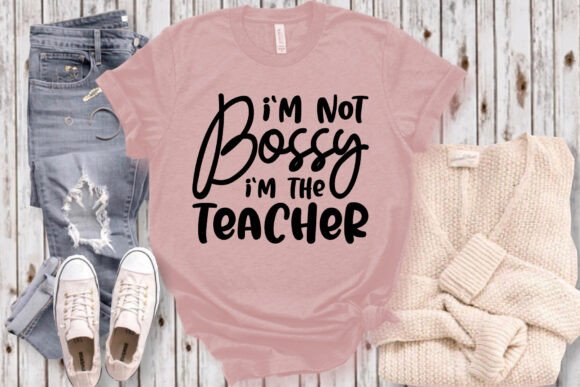
I'm sitting here with the "I'm Not Bossy I'm the Teacher" design open on my screen, planning a custom tote bag for a retiring kindergarten teacher. This isn't just a file check. It's the first step in deciding if a design will stitch well, feel right on fabric, and resonate with the person who receives it. As a designer who bridges digital files and physical stitches, my review is always about the journey from screen to thread.
The Immediate Mood: A Confident, Playful Statement
The first impression of this design is unmistakable. It's a confident, friendly rebuttal wrapped in a playful script. The layout is straightforward—the phrase is the star. This creates a mood that's both professional and warmly human, perfect for celebrating the authority and heart of a teacher. For an embroidery designer, this means the visual personality is clear and transferable. It doesn't feel like a generic graphic; it feels like a specific message waiting for the right fabric.
Where This Design Naturally Belongs
This design screams "gift." My mind immediately goes to personalized products for educators. A sturdy canvas tote bag for carrying classroom supplies feels like a perfect canvas. An apron for the art teacher, a cozy sweatshirt for the school librarian, or a neat pillow cover for a teacher's lounge gift. It also has strong potential as small shop merchandise—think boutique baby items with "My Teacher Mom" or simple patches for a denim jacket. The theme dictates the project: anything that honors the teaching role.
Real-Life Embroidery Performance: Thinking Beyond the Screen
In practical embroidery situations, the simplicity of this phrase is its greatest strength. For custom apparel like t-shirts and sweatshirts, a single-line, script-based design like this can be stitched with clean satin stitches for the lettering, resulting in excellent clarity. On a tote bag, it becomes a bold, durable statement. For baby clothes or nursery decor, scaled down, it could be a sweet nod to a parent's profession.
However, the devil is in the details, especially with script. When I imagine this as an embroidered patch, the connected letters need to hold their shape. On curved surfaces like caps, the flow of the script must be adjusted in the hooping to prevent distortion. This design's success in commercial embroidery projects will depend entirely on how the digitizer handled the joins and curves in the vector file.
Where to Use With Extra Care
Some applications require a designer's cautious eye. On very small hoop sizes, the fine details of script lettering can get lost or become overly dense. Embroidering this on thin or stretchy fabric, like a lightweight t-shirt, demands the right stabilizer to keep the text crisp. Dark fabric presents a classic challenge: will the chosen thread colors provide enough pop? For a phrase this good, you want it readable from a distance.
Layered garments with texture, like fleece-backed sweatshirts, can swallow finer stitches. And for products that need frequent washing—like kitchen towels or kids' apparel—the stitch density must be balanced to ensure longevity. The design must be robust enough to survive love and use.
The Impact on Your Project and Your Customer
Choosing the right embroidery file directly affects visual appeal and product value. A well-executed stitch of this phrase on a handmade product conveys thoughtfulness. It builds customer trust because the finish looks professional. For a creative entrepreneur, it supports brand consistency if you specialize in educator gifts or witty apparel.
Its giftability is high. It's recognizable and personal. This directly boosts buyer engagement in an Etsy listing or at a craft fair—people connect with the message instantly. For an embroidery designer working on client projects, it provides a ready-made, strong concept that requires minimal explanation.
Practical Designer Notes Before You Hoop
Always test a new design on scrap fabric first. Use fabric similar to your final product. For "I'm Not Bossy I'm the Teacher," check the thread color contrast against your background fabric. Review the stitch density in your software preview; a very dense fill in the letters can make stiff patches. Confirm your intended hoop size can accommodate the design's width without cramping the script.
Inspect the small details, especially where letters connect. Test the design in simple black and white mockups to see its form without color distraction. Compare how it looks on light and dark fabric backgrounds in your mind—you may need different color palettes for each. Use proper stabilizer for the fabric type; script on a tote bag might need a firm cutaway, while on a cap it might need a flexible adhesive.
Since this product is listed under Freebies and Graphics, the crucial step is to confirm the licensing terms. Check the provided product description or source site to understand if usage is for personal projects only or if commercial use is allowed for selling finished items like embroidered bags or shirts. This is essential for craft business owners and Etsy sellers. The bundle contains multiple file formats—SVG, PNG, EPS, DXF, PDF—which is excellent for flexibility across software and for creating printable mockups. The claim of being a 100% vector file and resizable at 300 DPI suggests good quality for scaling, but always verify this in your own embroidery software by testing a few sizes before committing to a final project.
Final Thoughts: A Design With Clear Purpose
The "I'm Not Bossy I'm the Teacher" craft design is a focused tool. It won't fit every project, but for the niche it serves—celebrating educators—it is potent. Its value for an embroidery designer lies in its clear message and the straightforward embroidery path it likely offers. It feels less like a decorative element and more like a central statement. That makes it powerful for a personalized gift, a standout item in a small shop product line, or a confident addition to a teacher's everyday life. My tote bag project is green-lit; the design passes the practical review. Now, it's time to choose the thread.